
Automate issuing process
This documentation describes the automation of the certification process using BCdiploma's REST APIs, composed of multiple endpoints
The interface for publishing certificates can be executed as follows:
- Issuer send the data to be certified to the BCdiploma APIs. Optionally, the certificates can be sent automatically by email
- Optionally, the BCdiploma API push to the issuer’s API a notification that the certification processing has been performed
- Issuer retrieve the URLs certified by BCdiploma
- Optionally, the issuer sends the generated certificates by email
- Optionally, the issuer deletes the historical data used to certify
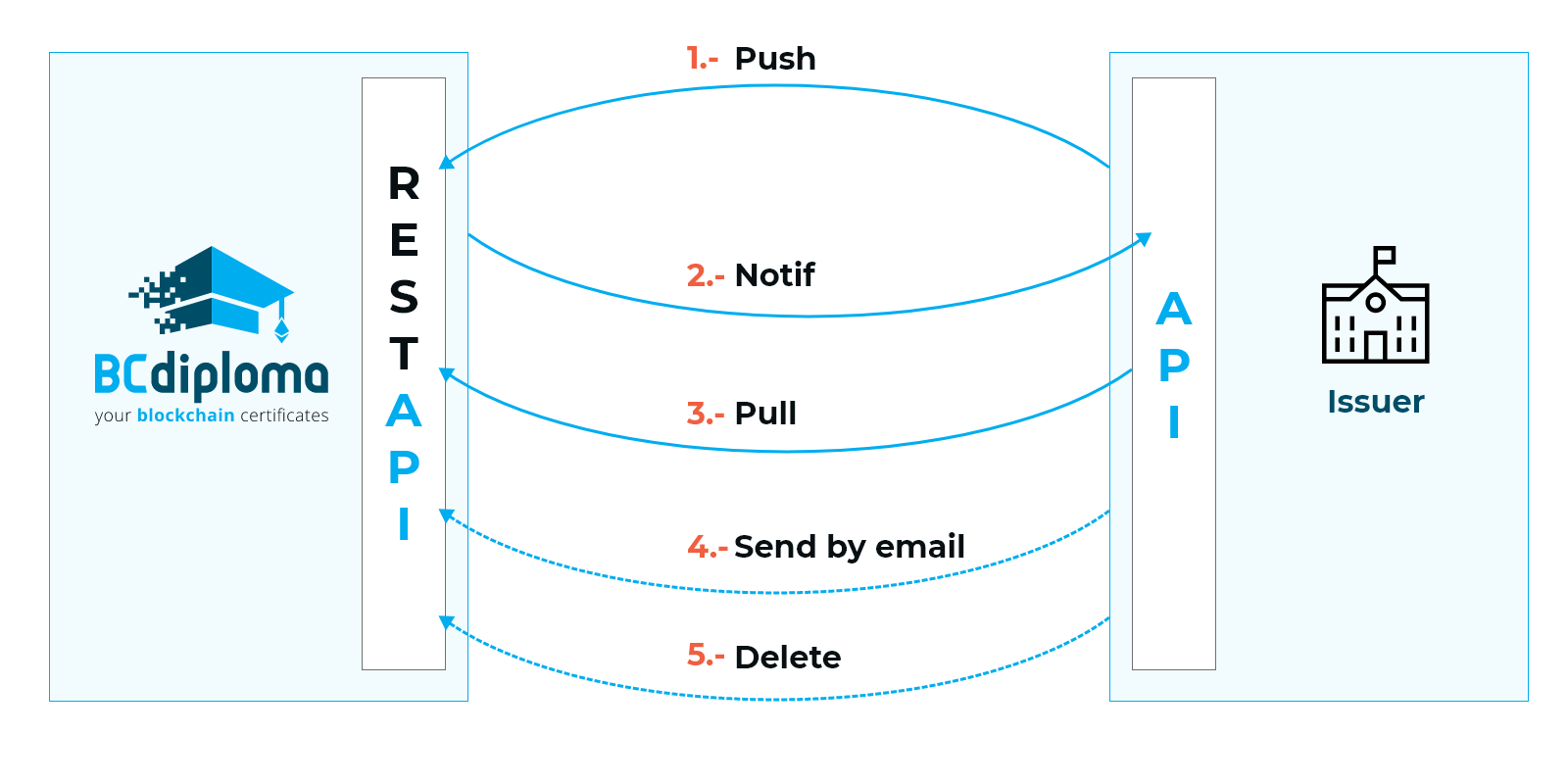
Details of the different API's methods, asynchronous with each other:
1- Request for data certification: The issuer’s program calls BCdiploma's "Push" service with the following parameters
- one or more "lines" of data to be certified, including a unique identifier per line (ID Data)
- a template identifier to use
- the authentication token previously obtained
- optionally, the information to send the certificates automatically by email
- optionally, a ZIP file containing the documents to be certified
The service returns a campaign (batch) identifier to identify the processing.
2- Notification of processing performed (optional): Once the certification process is complete, BCdiploma calls the Issuer’s notification service with the corresponding campaign ID as a parameter. This notification is optional. If it is not implemented, simply ensure that the retrieval of certified links (step 3) is done only 30 seconds after the data certification request (the process is asynchronous).
3- Retrieval of certified links: The issuer’s program calls the BCdiploma "Pull" service with the following parameters:
- the identifier of the campaign from which the certified link(s) must be retrieved
- the authentication token previously obtained The service then returns the ID-URL pairs set of the corresponding campaign, which can be stored in the issuer’s database.
4- Sending the generated certificates by email: The issuer's program calls the Web service for sending emails with the following parameters:
Tips
This can be done automatically in step 1.
- the identifier of the campaign containing the certificates to be sent
- the identifier of the template used for this campaign
- the identifiers of the data lines for which the certificates are to be sent
- the subject of the email
- the email reply address
- the "From" address of the email
5- Deleting the data history: The issuer’s program calls BCdiploma's "Delete Data" service to delete the data used for certification, with the following parameters:
the identifier of the campaign whose data is to be deleted
the authentication token previously obtained
Request for data certification “Push” (1)
The “Push” service is accessible through a POST call to endpoint [API-URL]/admin/data.
The body of the request is a JSON formatted string: 3 fields are required:
- templateId: the id of the template to use for publication. It can be retrieved in the backoffice, by clicking on the image of a certificate template. The identifier is located after the & at the end of the URL. Example: for the template
https://certificate-staging.bcdiploma.com/template/2&0x13, it is0x13. - contentType: "application/json" or "text/csv" depending on the chosen format (application/json preferred)
- data: data of one or multiples certificates in JSON or CSV depending on the chosen format (JSON is preferred)
Warning
Warning: injecting HTML into certified data is prohibited for security reasons. Requests containing HTML will be automatically rejected by the BCdiploma firewall.
Several optional fields are available:
- notification: the email address to which the publication and email sending reports will be sent
- notes: a note that will be added in the campaign information
- automated-emailing: triggers the automatic sending of certificates by email as soon as they are published. In the following example, it is suffixed by -deactivated to avoid any manipulation error. The fields object, reply_to and from_name must be present for the request to be valid. However, if you specify an empty string value "" for these fields, then the available default values will be used. Two optional and mutually exclusive fields are used to specify an email template when multiple email templates are available:
- The mailingTemplateId field is used to specify an email template by its identifier.
- The mailingTemplateLabel field is used to specify an email template by its label (an alias).
Finally, you can specify one or more addresses to be copied or blind copied using the optional fields cc (Carbon Copy) and bcc (Blind Carbon Copy), as shown in the example below.
Tips
Important best practice: BCdiploma APIs have been optimized for "batch" publishing: that means that one API call containing multiple certificates should be preferred to multiple calls containing only one certificate. This last approach can cause performance issues during your publications. Unless you have business or technical constraints that justify it, it is discouraged..
Caution
Be careful, the element "automated-emailing" in the header of the JSON structure will trigger the automatic sending of certificates by email once the campaign is published. In the following example, it is suffixed with -deactivated to avoid any manipulation error.
Tips
All fields must be specified by name in the data to be certified, including those with a "" value.
Example:
{
  "templateId": "0x01",
  "contentType": "application/json",
  "notes": "This is a note relating to the campaign",
  "notification": "your_address@your_domain.com",
  // Remove the -deactivated suffix to enable automatic emailing of certificates
  "automated-emailing-deactivated": {
    // The fields "object," "reply_to," and "from_name" are mandatory
    // The "object" field cannot be an empty string "", unless a default value
    // has been set in your environment (upon request)
    "object": "Your Digital Credential Has Arrived!",
    // The "reply_to" field can be an empty string ""; in that case,
    // the default email address noreply-bcd@bcdiploma.com will be used
    "reply_to": "",
    // The "from_name" field can be an empty string ""; in that case, your sender name
    // will be used
    "from_name": "BCdiploma",

    // The following fields are optional and mutually exclusive.
    // They are used to specify the email template to be used
    // when several email templates are available
    // "mailingTemplateId": "10115920"
    // "mailingTemplateLabel": "SCPD"
    "cc": [
      {
        "email": "email-to-cc1@yourdomain.com",
        "name": "1st address in BCC"
      },
      "email-to-cc2@yourdomain.com"
    ],
    "bcc": [
      {
        "email": "email-to-bcc@yourdomain.com",
        "name": "First address in BCC"
      },
      "email-to-bcc2@yourdomain.com"
    ]
  },
  "data": [
    {
      "ID": "1234",
      "Email": "john.doe@bcdiploma.com",
      "language": "en",
      "firstName": "John",
      "lastName": "DOE",
      "obtentionDate": "2020-03-27",
      "expirationDate": "2035-03-27",
      "assessment": "",
      "linkLabel": "",
      "linkURL": ""
    },
    {
      "ID": "4567",
      "Email": "bob.die@bcdiploma.com",
      "language": "en",
      "firstName": "Bob",
      "lastName": "DIE",
      "obtentionDate": "2020-03-27",
      "expirationDate": "2035-03-27",
      "assessment": "",
      "linkLabel": "",
      "linkURL": ""
    }
  ]
}
Response
The response will have the status 200 if everything is OK. It will also contain a JSON with a campaignId field: this is the ID of the campaign, mandatory to be able to retrieve the data later.
Association of files to certify
If your certificate template allows it, you will be able to associate a file (photo, zip archive, PDF) with each certificate when publishing. Note that this process uses the same level of encryption as the certificate data.
The principle is as follows:
- In your certificate template, identify the "Cfile" field that is supposed to contain the file name (e.g. "Photo", "Document"...);
- When publishing, indicate, for each certificate, in this "Cfile" field a file name, for example "MyDocumentToBeCertified1.pdf", "MyDocumentToBeCertified2.pdf". Note that currently only png/svg/jpg, PDF and ZIP formats are supported;
- When publishing, attach a compressed archive (.zip) containing all the files to be associated with the generated certificates, respecting the file names indicated in the "Cfile" field.
Technically, the data certification request with documents differs from the classic data certification request in the following points:
- the contentType must be "multipart/form-data
- the json containing the data to be certified must be placed in the "body" field of the multipart
- the zip archive containing the files to be associated with the certificates must be placed in a "file" field of the multipart
Each certificate will be generated in association with its file based on the correspondence between the value of "Cfile" and the file name in the archive.
Example of a call with cURL :
curl --request POST \
 --url https://api-staging.bcdiploma.com/admin/data \
 --header 'Authorization: Bearer eyJ[...]QWQ' \
 --header 'Content-Type: multipart/form-data' \
 --form 'body={
"templateId":"0x01",
"contentType":"application/json",
"notes": "This is a note relating to the campaign",
"notification": "your_address@your_domain.com",
// Remove the -deactivated suffix to enable automatic emailing of certificates
"automated-emailing-deactivated": {
"object": "Test emailing from API",
"reply_to": "support@bcdiploma.com",
"from_name": "API robot"
},
"data": [
{
"ID":"1234",
"Email":"john.doe@bcdiploma.com",
"language":"en",
"firstName":"John",
"lastName":"DOE",
"obtentionDate":"2020-03-27",
"expirationDate":"2035-03-27",
"assessment":"",
"Document":"MonDocumentaCertifier1.pdf",
"linkLabel":"",
"linkURL":""
},
{
"ID":"4567",
"Email":"bob.die@bcdiploma.com",
"language":"en",
"firstName":"Bob",
"lastName":"DIE",
"obtentionDate":"2020-03-27",
"expirationDate":"2035-03-27",
"assessment":"",
"Document":"MonDocumentaCertifier2.pdf",
"linkLabel":"",
"linkURL":""
}
]
}' \
 --form 'file=@/home/Work/Documents/data/file_to_certified.zip'
Notification of processing performed (2) (optional)
Once the certification process is completed for a campaign, the BCdiploma API can call a REST endpoint of your choice, using either a GET or POST request and passing the completed campaign's identifier (campaignId) as a parameter in the request.
Example: If the endpoint specified by the issuer is https://api.issuer.com?campaignId=${campaignId}, the API will call https://api.issuer.com?campaignId=XXX, where XXX represents the ID of the completed campaign. Generally, ${campaignId} will be replaced by the campaign ID in the URL and the body in the case of a POST call.
To set up this endpoint, you can contact support or use the APIs provided below. These APIs allow you to configure, retrieve, and test an endpoint for the notification API.
Configuring an Endpoint for the Notification API
The endpoint configuration service is accessible via a POST call to [API-URL]/issuer/XXX/notif, where XXX is the issuer ID.
Required HTTP Header: Content-Type: application/json
The request body must be a JSON string containing the following mandatory fields:
- url: the URL of the endpoint to be called;
- method: the type of call, either
GETorPOST; - content: in the case of a
POST, the body to be transmitted during the call.
Example for a GET endpoint:
{
  "url": "https://api.issuer.com?campaignId=${campaignId}",
  "method": "GET"
}
Example for a POST endpoint:
{
  "url": "https://api.issuer.com?notification",
  "method": "POST",
  "content": {
    "id": "${campaignId}",
    "from": "BCdiploma",
    "operation": "CAMPAIGN-NOTIFICATION"
  }
}
Retrieve the Current Endpoint for the Notification API
The service to retrieve the current endpoint for the Notification API is accessible via a GET request to the endpoint [API-URL]/issuer/XXX/notif, where XXX represents the issuer ID.
Test the Current Endpoint for the Notification API
The service to test the current endpoint for the Notification API is accessible via a GET request to the endpoint [API-URL]/issuer/XXX/testnotif, where XXX represents the issuer ID.
Retrieval of the certified links (3)
"Pull" recovery of certified links is possible via a GET service. It allows you to retrieve certificate links and a lot of other information. It can be accessed at the [API-URL]/admin/data?campaignId=XXX endpoint where XXX is the identifier of the campaign given in response to the "Push" service. The response will contain the certificates in JSON format, including :
- All the technical fields and the fields used for certification, if the data have not been deleted.
- The unique key identifying the certification
key, its URL for viewingurl. - Its issue status
StatusID(1=Published; 3=Deleted; 6=Expired; 9=Disabled) - The
emailstatus and the possible date of an email sending for theLastActivitycertificate - The url of the corresponding badge if it exists
badge.
Sample answer:
{
  "data": [
    {
      "EvidenzId": 282253,
      "ID": "1234",
      "Email": "john.doe@bcdiploma.com",
      "firstName": "John",
      "lastName": "DOE",
      "obtentionDate": "2020-03-27",
      "expirationDate": "2035-03-27",
      "StatusID": 1,
      "available": true,
      "key": "3145612112FF7EE4FB5F3BC564D2B25002E9960A59A2F1C255419925663345FAWzIbDb2ewSNEQV8RXoyDCr4pbh6Ith6EYfLEFVccRXWBts40",
      "Language": "en",
      "LastActivity": null,
      "mail": false,
      "StartDate": null,
      "EndDate": "2035-03-27",
      "PublicationDate": "2020-03-27T14:04:52.277Z",
      "url": "https://certificate-demo.bcdiploma.com/check/3145612112FF7EE4FB5F3BC564D2B25002E9960A59A2F1C255419925663345FAWzIbDb2ewSNEQV8RXoyDCr4pbh6Ith6EYfLEFVccRXWBts40",
      "badge": "https://api-demo.bcdiploma.com/badges/assert/3145612112FF7EE4FB5F3BC564D2B25002E9960A59A2F1C255419925663345FAWzIbDb2ewSNEQV8RXoyDCr4pbh6Ith6EYfLEFVccRXWBts40"
    },
    {
      "EvidenzId": 282254,
      "ID": "4567",
      "Email": "bob.die@bcdiploma.com",
      "firstName": "Bob",
      "lastName": "Die",
      "obtentionDate": "2020-03-27",
      "expirationDate": "2035-03-27",
      "StatusID": 3,
      "available": false,
      "key": "B7B263810A47B75841872910721EE07DA574C103CEBC9CB115754DFCB91A4EB8qV2GWHI2ZTTystVlzesdxlYLNwBDjCIX%2BvhdVkyd3WQMXvOi",
      "Language": "en",
      "LastActivity": null,
      "mail": false,
      "StartDate": null,
      "EndDate": "2035-03-27",
      "PublicationDate": "2020-03-27T14:04:52.277Z",
      "url": "https://certificate-demo.bcdiploma.com/check/B7B263810A47B75841872910721EE07DA574C103CEBC9CB115754DFCB91A4EB8qV2GWHI2ZTTystVlzesdxlYLNwBDjCIX%252BvhdVkyd3WQMXvOi",
      "badge": "https://api-demo.bcdiploma.com/badges/assert/B7B263810A47B75841872910721EE07DA574C103CEBC9CB115754DFCB91A4EB8qV2GWHI2ZTTystVlzesdxlYLNwBDjCIX%252BvhdVkyd3WQMXvOi"
    }
  ]
}
Sending certificates by e-mail (4) (optional)
The service for sending email is accessible by a POST call to the [API-URL]/admin/emails endpoint.
Mandatory HTTP header: Content-Type: application/json
The body of the request is a string formatted in JSON : Some fields are mandatory:
- campaignId: the identifier of the campaign containing the certificates to be sent
- ids: the identifiers of the data lines for which certificates are to be sent, separated by ;. These data identifiers were returned in the EvidenzId field of the certified link retrieval request;
- object: the subject of the email. If an empty string value "" is specified, then the available default value will be used;
- reply_to: sender's and reply email address. If an empty string value "" is specified, then the available default value will be used;
- from_name: the name to be displayed as the sender of the email. If an empty string value "" is specified, then the available default value will be used. Warning, this field cannot be an email.
...and some fields are optional :
- notification: the address to which the email campaign success report is sent;
- The mailingTemplateId field is used to specify an email template by its identifier.
- The mailingTemplateLabel field is used to specify an email template by its label (an alias).
Finally, you can specify one or more addresses to be copied or blind copied using the optional fields cc (Carbon Copy) and bcc (Blind Carbon Copy), as shown in the example below.
For example:
{
  "campaignId": "959",
  "ids": "19123;19124",
  "object": "Demo emailing",
  "reply_to": "noreply-bcd@bcdiploma.com",
  "from_name": "BCdiploma robot",
  "notification": "you@yourdomain.com",
  // "mailingTemplateId": "10115920"
  // "mailingTemplateLabel": "SCPD"
  "cc": [
    {
      "email": "email-to-cc1@yourdomain.com",
      "name": "1st address in BCC"
    },
    "email-to-cc2@yourdomain.com"
  ],
  "bcc": [
    {
      "email": "email-to-bcc@yourdomain.com",
      "name": "First address in BCC"
    },
    "email-to-bcc2@yourdomain.com"
  ]
}
campaignId can be replaced in the body of the query by templateId. In this case the certificates from the "View All Certificates" view of the corresponding template can be emailed.
- templateId: the identifier of the template used for this campaign. It can be retrieved in the backoffice, by clicking on the image of a certificate template. The identifier is found after the & at the end of the URL. Example: for the template
https://certificate-staging.bcdiploma.com/template/2&0x13, it is0x13.
For example:
{
  "templateId": "0x13",
  "ids": "19123;19124;56478;78451",
  "object": "Demo emailing",
  "reply_to": "noreply-bcd@bcdiploma.com",
  "from_name": "BCdiploma robot",
  "notification": "your_address@your_domain.com"
}