
Getting Started with BCdiploma
Welcome to BCdiploma, the application that allows you to issue and share secure certificates on the blockchain in just a few clicks, using a simple and intuitive web interface. On this page, you will find the following articles:
- Create your first template
- Issue and send your first certificate
- FAQ
- How do I access the BCdiploma app?
- How do I log in to BCdiploma?
- How do I subscribe to a plan?
- How do I remove the “Demo Certificate” and “Not Verified” labels?
- How do I add team members?
- How can I track email delivery?
- What is the SBT format and what is it for?
- How and why should I add my organization’s LinkedIn account?
- How do I use Zapier with BCdiploma?
- How do I access a testing environment?
Create your first template
BCdiploma lets you create templates in just a few minutes, with designs and content as varied as:
Jade Balance | Sustainability Light | Blueprint Strategy | Midnight Vision
The  button first invites you to choose the language(s) of your new template. For each selected language, a creation form will be available.

You can upload your main image, or badge image. You also have the option to create one beforehand via the creation studio, accessible via the  button on BCdiploma’s homepage. You can then add it to your template via the form.
You can use Markdown syntax to customize your descriptions and insert clickable links.
Done customizing all the text content, logos, and links? Let’s move on to layout and design.

To explore the variety of available styles, load one of the predefined templates from  . To start your own design, go to the
  tab after choosing a layout with
  in 1, 2, or 3 columns.
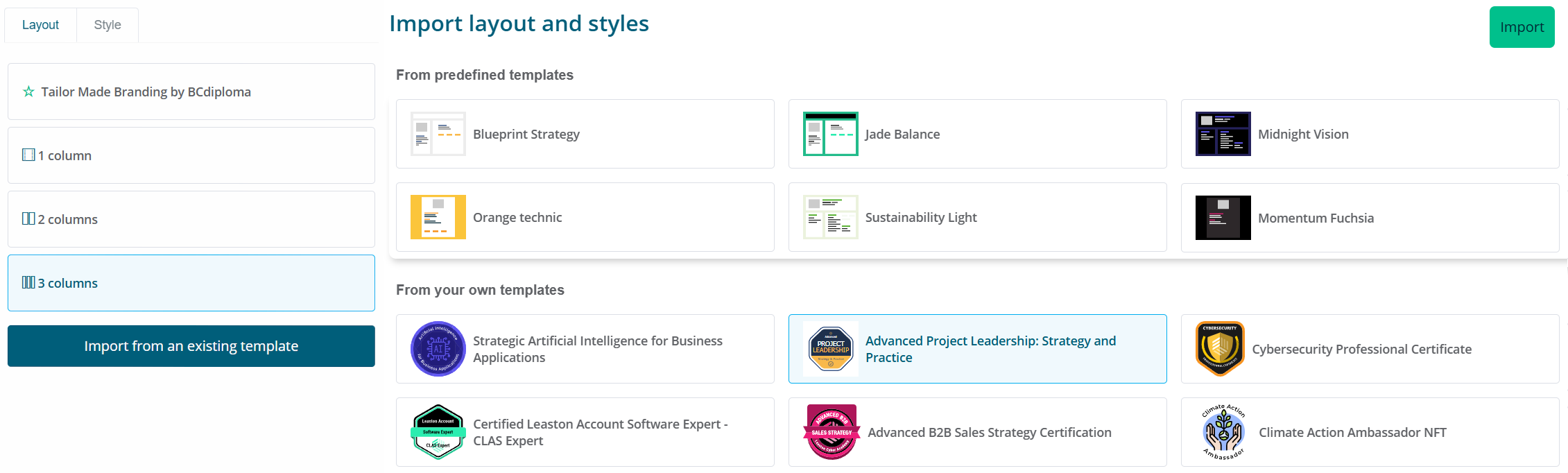
Happy with the result? All that’s left is to confirm the creation of your first template so you can start using it.
Issue and send your first certificate
The process is simple: upload your Excel data file and the rest happens instantly.
Download the blank import file from the dropdown menu  of your template on the homepage. Fill in at least the required fields:
 language, ID, Email, firstName, lastName, obtentionDate. For basic multilingual use, set the language cell to all.
Then upload your file using the  button of your template on the homepage, and follow the guide! From the issuing report, all that’s left is to
  .
.
Congratulations, you’ve just completed your first campaign!
FAQ
How do I access the BCdiploma app?
BCdiploma is accessible at https://admin.bcdiploma.com (data and application hosted in the Europe zone, by default) or https://admin-cus.bcdiploma.com (data and application hosted in the US zone, available on request).
How do I log in to BCdiploma?
- Go to the BCdiploma application URL.
- Click on the “Start” button.
- Enter your email address and click “Start”.
- In your inbox, click the secure login link from the “BCdiploma login” email.
How do I subscribe to a plan?
- Go to “My Plan” from the dropdown menu at the top right, by clicking on your name.
- Choose the “Essentials Pack” plan that suits you: for example, “Up to 500 learners”.
- Select your billing currency and don’t forget to copy and paste the discount coupon: it will apply to the displayed price.
- Get your credit card ready and click “Subscribe”.
Have a question about how the subscription works? See our Pricing & Subscription FAQ.
How do I remove the “Demo Certificate” and “Not Verified” labels?
These labels appear on your certificates as long as your institution's identity hasn't been verified. Identity verification takes place right after subscribing to your plan. Certificates already issued will still be preserved.
How do I add team members?
- Go to “Administration”, then the “Users” tab.
- You can add as many team members as you like, specifying their permission levels.
How can I track email delivery?
From your campaign report, accessible via the “Campaign” tab, the “Email” column shows the delivery status: Not Sent, Sent, Bounced, or Opened. Using the filter, you can resend emails to recipients who haven’t opened them.
What is the SBT format and what is it for?
When creating a template, you have the option to enable the SBT format. Certificates from this template will then be issued as "SoulBound Tokens", or non-transferable NFTs. An SBT is a token issued on the blockchain, tied to the holder’s wallet and impossible to transfer. Optionally, it can be claimed in a Web3 wallet — such as BCdiploma’s mywallet or any compatible Web3 wallet — allowing the holder to prove certificate ownership in a decentralized way. This is an innovative format but requires learners to use a wallet. Learn more in this article.
How and why should I add my organization’s LinkedIn account?
Setting your organization’s LinkedIn ID allows learners to automatically link their certificate to your organization’s LinkedIn page when they add it to their profile. This feature is available starting from the Essentials Pack. To do this:
- Go to “Issuer Profile” from the dropdown menu at the top right, by clicking on your name.
- Under the “Shares and External Links” tab, enter your LinkedIn organization ID.
How do I use Zapier with BCdiploma?
Log in to your Zapier application builder and use one of our sample templates or create your own. You will need your API key, which you can generate under the “Administration | API” tab.
How do I access a testing environment?
Depending on your BCdiploma license contract, you may have access to a testing environment in addition to your production environment.
BCdiploma’s testing environment is available at https://admin-staging.bcdiploma.com. This environment lets you issue certificates at no cost on a test blockchain, allowing you to:
- safely explore all features of the BCdiploma app
- test your datasets and structures
- preview and test your certificate layouts
- test email delivery and preview what recipients will see